Prog-Studio 2006
6 of 6 Article

Prog-Studio is a modern, comprehensive, and very productive micro-controller development environment for industry standard 8051 (MCS-51) microcontroller architecture chips.
Working programs could be created with just a few steps. Subsequently, the program could be debugged. A hardware microcontroller is not nessasary, because Prog-Studio includes a source level debugger and a MCS-51 Emulator. Programs can be transmitted to the microcontroller by just one click (ISP In-System-Programming).
Prog-Studio provides a high level of comfort for the MCS-51 developer thanks to functions like Project Management, Dockable Windows, Code-Folding, and Edit & Continue. This type of functionality is typically only available for expensive IDE’s offering high-level PC languages. Beginners prefer Prog-Studio because they like the intuitive usability of this IDE and also the good examples which help to understand the assembler language.
Goal
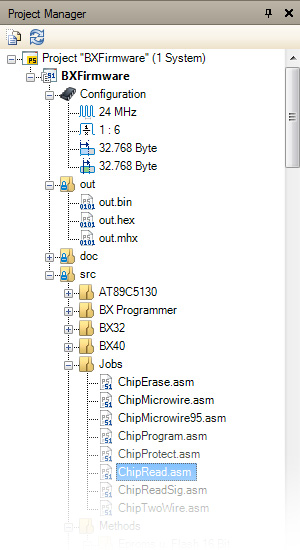
The goal of the Project Manager is to simplify the management of your project and reduce as much complexity as possible. We would like to enable you to concentrate on the essentials: Creating source code and documentation.
Easy
A new project is created with just a few mouse clicks. Prog-Studio supports the structured development of programs by the consistent implementation of project orientated development.
Source code, documentation, published data and project settings are managed centrally by a project manager: Adding new files and folders, copying, moving, or erasing are accomplished by the project manager in the usual way (shortcuts, context menus and drag & drop) - an external file manager is not required.
Multi Controller Projects
In some cases, several micro-controllers are required during the implementation of a project.
This situation is supported by the project manager, which automatically groups all files and settings for each micro-controller into systems.
Any number of these systems can be contained in a project and allow for even highly complex projects with several micro-controllers to be developed in Prog-Studio.
Comfortable, Fast and Reliable
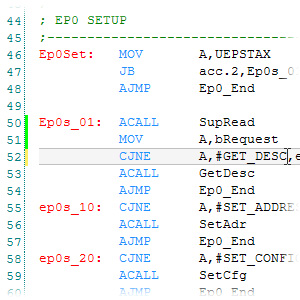
The source code editor was developed and adjusted in order to allow the comfortable, simple and sufficiently clear coding of programs attained by current technologies such as code-folding, line-marking and code-highlighting.
Code-folding allows for the maximizing and minimizing of code segments. That way you can increase the legibility of your program by hiding non-relevant sections.
Clearly arranged and Customizable
View the lastest modifications on your fingertips, as all recent changes are marked with a green indicator at the beginning of each line. Unsaved changes and modifications are marked with yellow indication.
Many features are customizable in the software options.
Efficient
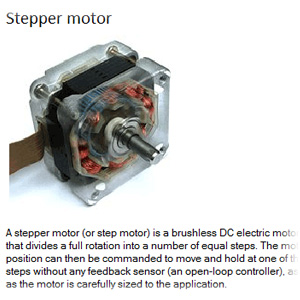
In most cases, documentation is created before and during the development process. In order to avoid time-consuming re-work, a documentation editor has been integrated into the Prog-Studio software allowing a promt documentation of information and important data content.
Number lists can be created and text can be formatted into different fonts supporting normal, bold, cursive, cross out, underlined formatting, as well as coloring and colored backgrounds.
The need for notes or text editing software running in parallel belongs to the past just as much as staying up late to write the documentation.
Interoperable
This editor uses the rich-text file format. This is a standardized format, which can therefore be read and stored by many programs offering a wide range of formatting options.
Run time variables up-to-date
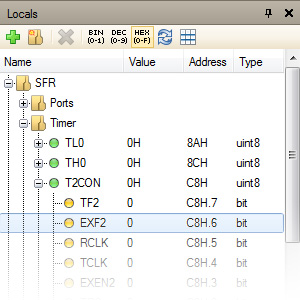
The current values of runtime variables are always shown. You can view all local variables, and also specify targeted watch lists. If this is not enough, you can view all of the emulated RAM storage directly.
Modified values are highlighted to make sure you don’t miss any important changes. Running values can be changed at will in the lists. All visualized data can be viewed in both, hexadecimal and decimal formats.
Nothing gets in the way of a fluid workflow more than having to interrupt a debug session to correct mistakes. This interruption is not necessary when using Prog-Studio. You can make changes directly to the source code during a debug session. The IDE saves the current state of the emulator in the background and recompiles the program. After assembly, program execution continues from the current program position. The time required to fix detected errors is reduced drastically.
Repetitive source code functions can be defined as macros. This increases the legibility of the source code and makes the program a lot easier to maintain. During a debug session, the directions of the macro calls are marked during execution. This way the programming logic remains comprehensible and traceable.
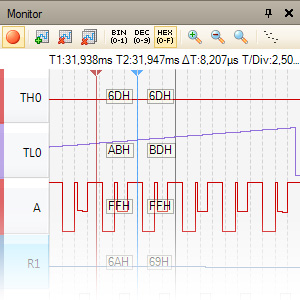
Time-Dependant Analysis
For a time-dependant analysis, you can display desired ports or variables in a monitor similar to an oscilloscope. With two tracing bars you can take time and value measurements of all channels. Unlike a real oscilloscope, there is no limit on the number of channels.
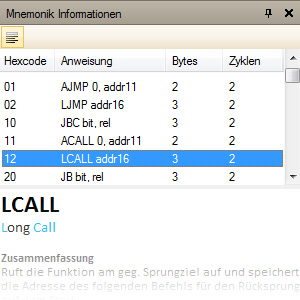
Quick Assembler Reference
Who hasn’t had this happen to them? You look for a specific assembly instruction and it's allowed parameters. Looking it up in a book becomes unavoidable at the latest when you need to know how many cycles this instruction needs. This interruption to your work is not necessary with Prog-Studio. All assembly instructions for the MCS51 micro-controllers are clearly laid out in the assembler mnemonics list. If desired, the assembly instructions can also be displayed grouped by category.
Questions, such as which jump instruction takes the least cycles or what variations of the CJNE instruction are available, are answered quickly.
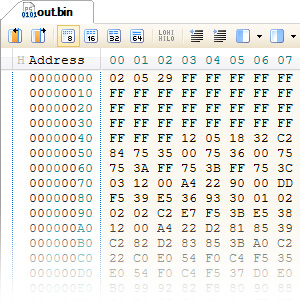
Inspect binary data
The integrated hex editor not only allows for comfortable binary data manipulation, but also supports pasting entire data sets. The hex-editor reads and writes Intel-Hex and Motorola-S-Record data files in addition to binary data files.
You can adjust the display of data to meet your requirements. For example, you can pre-set the amount of bytes to be displayed per row or whether you want to see the data as individual bytes or in word, double-word, or quad-word format.
Checksum calculation as well as various automatic data manipulations are supported. Incrementing or decrementing entire ranges, filling a range with random or sequential values, or switching nibbles or bytes does not pose a problem.
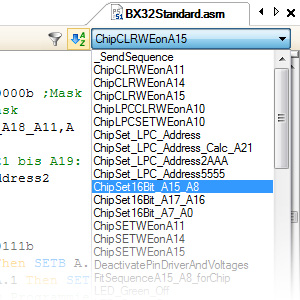
Jump Label
Finding a specific label is made possible not just by the comprehensive search functions of the IDE. All labels for the file currently displayed are quickly selectable through a selection list. For qucik access this list is located immediately on top of the data entry screen.
Filter, Sort
In addition, this list can be sorted and filtered to remove less important labels.

View errors
Everybody makes programming errors! In order to get rid of them quickly, Prog-Studio offers detailed error descriptions including file path, line number and position within the line.
Clicking on an error in the error list is all it takes to open the corresponding file and set the cursor to the error location.
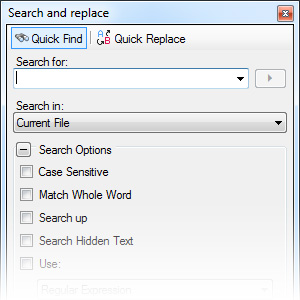
Quick and Easy Finding
Prog-Studio offers a very easy to use search and replacement interface. Of course, searching is not limited to one file but can be expanded to include the entire project. Matching case, selecting the search direction and limiting the search to whole words can be done quickly and comfortably using easy to reach options.
In the options section, you can also change the type of search. The classic full-text search, searching with wildcards (known from the DOS era) and searching with regular expressions are all available. When searching with regular expressions, replacing the source can also be done with regular expressions.
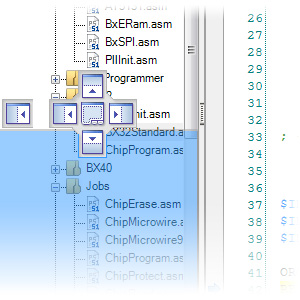
Flexible
Whether you want to move a window, have it floating, or automatically hide and integrate specific windows is up to you. You can configure your “Workplace” Prog-Studio completely according to your personal preferences.
We would like to show you how easy it is to use the Prog-Studio software in a video presentation. In approx. 5 minutes we'll present the creation of an small project and use it to illustrate the capabilities of Prog-Studio.
Download our free Prog-Studio Community with many features to be discovered by you.
Please note: The community version is free of charge with limited features dedicated to beginners with small projects.
If you order today, you will get all updates and every new version (including all major updates) free of charge for the next 12 months.
Even if the period of 12 months has expire, we won't let you down. We will always offer discounted updates for all versions. Please contact our service department for a quote.
Click here to read more about the license models.